SMS Notification Consent
Last updated: September 9, 2026
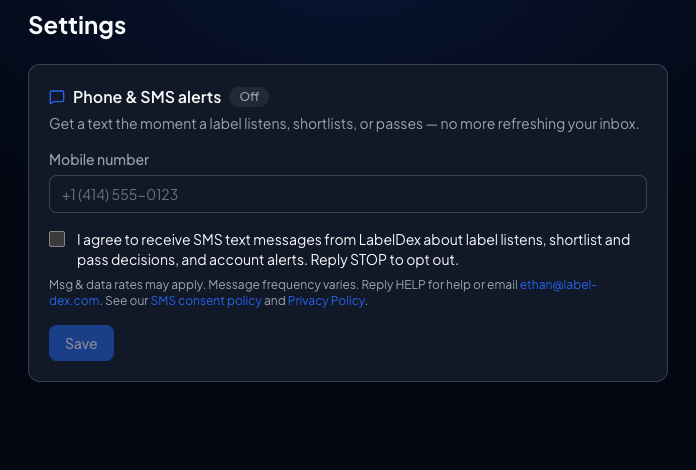
LabelDex sends text messages only after you explicitly opt in. There is no SMS consent buried in our terms of service and nothing is pre-checked — you enter your phone number, you check one box, and that's the only way SMS alerts get turned on.
How you opt in
- Enter your mobile number in onboarding or Settings → Phone & SMS alerts in your LabelDex dashboard.
- Check the consent box.
- Verify the number with the 6-digit code we text you — alerts turn on only after that.
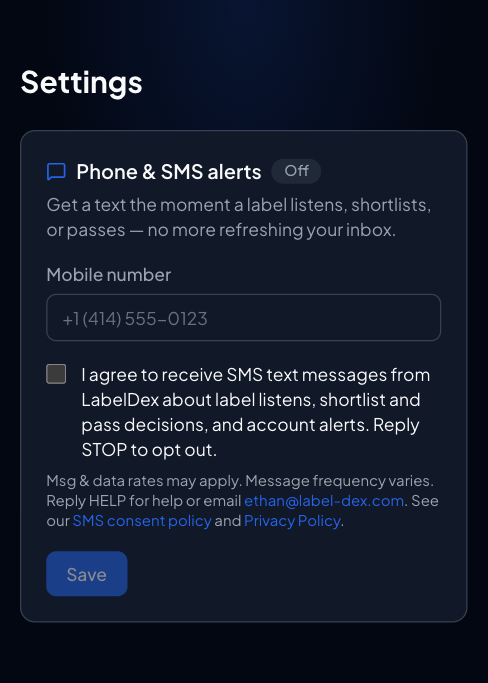
“I agree to receive SMS text messages from LabelDex about label listens, shortlist and pass decisions, and account alerts. Reply STOP to opt out.”
That checkbox is the opt-in. It stands on its own — accepting our Terms or Privacy Policy never signs you up for texts.
What you'll receive
- A text when a label listens to your track
- A text when a label shortlists or passes on your submission
- Important account alerts
Example messages:
LabelDex: High Velocity Records just listened to “Night Run”.
LabelDex: Night Shift Recordings shortlisted your submission. Check your inbox.
LabelDex: Your account alert — a label replied to your message.
Message frequency & cost
Message frequency varies with your activity — usually no more than a few per week. Message and data rates may apply. You can turn SMS off any time (see below).
How to opt out
Reply STOP to any message and we'll stop texting that number immediately. You can also uncheck the consent box under Settings → Phone & SMS alerts. To come back, reply START or turn SMS alerts back on in Settings.
Help
Reply HELP to any message, or email ethan@labeldex.com.
Your number, our use
Your phone number is used only to deliver the alerts you opted into. We don't sell it and don't share it with third parties for their marketing. Mobile carriers receive message details for delivery. Everything else follows our Privacy Policy.